
01. Challenge
An Android app in React Native that talks to an existing Laravel store. Same basket, same prices, same loyalty club. Not one business rule duplicated.
- React Native 0.88
- Expo SDK 58
- Laravel 13
- Sanctum
- FCM HTTP v1
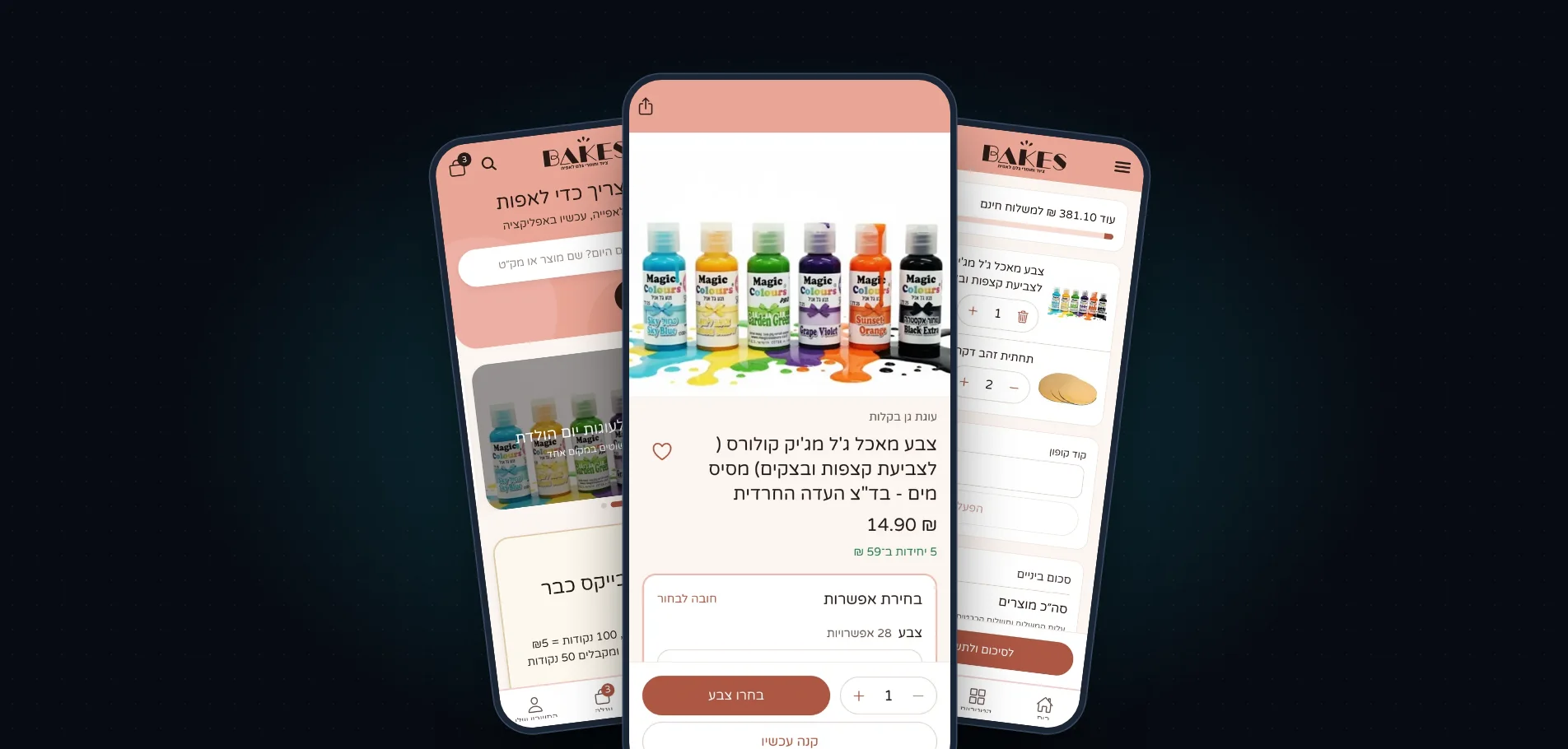
01. ChallengeA real app, without cloning the store
Bakes sells baking equipment and ingredients. Its website, built on Laravel 13 and Filament 5, already ran a catalogue with variations (colours, sizes), a tiered loyalty club, gift cards and CreditGuard payments. The ask: an app that feels like an app, not a website in a frame.
The risk in a project like this is not the screens. It is the app starting to calculate prices, coupons and free shipping on its own, until there are two stores drifting apart. So every decision began with one question: who owns this rule, the website or the app. The answer was almost always the website.
Native, not a wrapper
Native navigation, smooth scrolling, full RTL, Reanimated animations. The brand looks the same.
One source of truth
Prices, stock, coupons, free shipping and club tiers are computed on the server only. The app displays, it does not calculate.
Payment stays on the website
The app never sees a card number. One payment flow to maintain, and no Apple In-App Purchase.
Notifications that respect people
Not on the Sabbath, not at night, never more than two offers a week. A message that may not go now is delayed, not dropped.
And the development environment
Builds run on a Windows PC with a Hebrew user name, no Mac, and a 260-character path limit. It sounds like a detail, and it cost a full working day. The story is below.
02. ArchitectureA thin app, a server that decides
The app talks to the website through /api/v1 only. It does not know how a price is computed. It sends "add to basket" and receives a calculated basket. Three main flows run between the two sides:
Browsing and basket
JSON requests with a Bearer token and X-Install-Id. The server returns whitelisted presenters, never models. A price is never read from the client.
Payment
POST /cart/checkout returns a URL with a one-time code (10 minutes). It opens in a Custom Tab, adopts the basket in the browser and moves on to the regular /checkout. The card stays with CreditGuard.
Notifications
Order and basket events enter PushNotifier, pass a timing policy, and are sent from a queue straight to FCM HTTP v1. No SDK and no third-party service.
03. StackWhat it is built with
The app
- React Native 0.88 · React 19.3
- Expo SDK 58 · expo-router (file-based routing)
- TanStack Query 5 (cache and requests)
- Reanimated 4 · Gesture Handler · worklets
- expo-secure-store (Keystore) · expo-notifications
- expo-image · expo-web-browser (Custom Tabs)
- TypeScript · Jest
The server
- Laravel 13 · Filament 5 · Livewire 4
- Sanctum: access and refresh tokens
- MariaDB · queues and scheduler
- Direct FCM HTTP v1, JWT signed with RS256
- CreditGuard payments
- PHPUnit: 2,258 tests in the full suite
- Docker on a VPS
Build and release
- Android Studio · Gradle · Expo prebuild
- ninja 1.12.1 + LongPathsEnabled
- Package il.co.bakes · versionCode 13
- npm run version:bump: version, build and CHANGELOG together
- Google Play assets generated from a render of the app itself
04. BuildHow it was built, step by step
Everything is dated, because each step shipped as a server package with tests and as an app version with a CHANGELOG entry. From build 1 to build 13 took less than a week.
- 20.10pkg 21 · build 1
The API and the first app
One app for Android and iPhone, talking to /api/v1 only. Token security, device binding, payment handoff. 98 API tests with 340 assertions. Screens: home, categories, product, basket, account.
- 20.10Android Studio
The fight with Windows
A Hebrew user name broke Gradle (prefab). A 278-character path broke ninja. The fix: SDK in C:\Android\Sdk, project in C:\b, LongPathsEnabled and ninja 1.12.1. Then the package name changed to il.co.bakes before the first upload, because it is locked afterwards.
- 20.10Google Play
Store assets from the app itself
Descriptions, icon, graphics and 6 phone, 4 tablet and 4 desktop screenshots, all checked automatically against Play's requirements. The screenshots are a real render of the code, so they cannot go stale.
- 21.10pkg 27 · build 8–9
Push notifications
Direct FCM from Laravel, Sabbath and hours policy, two Android channels, a settings screen, audience campaigns, order templates edited in the panel, and an "update available" message.
- 22.10pkg 28 · 1.0.15 · build 11
Buy now and order summary
Add-to-basket buttons on product cards, "Buy now" with a separate temporary basket that never touches the customer's own, and an order summary screen before payment.
- 23.10pkg 30 · 1.0.16 · build 12
Abandoned baskets and push that opens the right screen
A reminder sequence by mail and push: hour 6, 30, 54, stopping at 72. Tapping a notification opens the basket, an order or a payment page, even from a cold start.
- 24.10pkg 39 · 1.0.17 · build 13
The club reaches the home screen
The banner recognises a signed-in member and becomes "My club" with her points. Same request, different state, decided by the token.
05. ScreensThe real app, not a mock-up
Every screenshot here is a live screen of the current version. Tap one to enlarge it.
Browse and search
Product and purchase
Club and account
Notifications
One screen, three states
The club banner is not fixed in the app. It is read from /home, and the server decides whether to show "coming soon", "live" or "my club", by the club's state and the customer's token. A guest's answer is cached publicly, a member's is private, and Vary: Authorization keeps them apart.
state: soonstate: livestate: memberScreenshots are renders of the real app code (version 1.0.17) against Bakes' public catalogue. The user name, points and basket are sample data.
06. DecisionsDecisions worth knowing
Payment stays on the website
The app calls POST /cart/checkout and gets a /app/checkout/‹48 chars› URL. The code is single-use, stored in cache only as a sha256, contains no basket token and does not sign anyone in. Opening the link adopts the basket in the browser and moves on to the regular checkout.
Three reasons: the app never sees a card, there is one payment flow to maintain, and Apple does not require In-App Purchase for physical goods. A wrong or old code leads to the basket with a sentence, not an error.
CheckoutHandoffController.php$token = $handoff->redeem($code);
$cart = $token ? Cart::query()->where('token', $token)->first() : null;
if (! $cart || $cart->items()->doesntExist()) {
return $this->private(redirect()->route('cart')
->with('notice', 'הקישור לתשלום כבר לא בתוקף. אפשר להמשיך מכאן.'));
}
CartManager::adopt($cart->token);
return $this->private(redirect()->route('checkout'));Tokens bound to the device
Two tokens: access for 30 minutes, and a 60-day refresh token that is single-use and rotating. Reusing an old refresh token returns 401 and disconnects the device. Every request carries X-Install-Id, and a token copied to another phone is rejected.
On the app side, the client refreshes once even when five requests fail in the same second. A refresh that is refused ends the session. A refresh that never reached the server signs nobody out.
EnsureTokenMatchesDevice.phpif (! $device || ! hash_equals((string) $device->install_id, $info->installId)) {
return response()->json([
'code' => 'session_invalid',
'message' => 'ההתחברות כבר לא בתוקף. יש להתחבר מחדש.',
], 401);
}src/api/client.tsasync request<T>(method: string, path: string, o: Options = {}): Promise<T> {
const auth = o.auth ?? true;
let res = await this.send(method, path, o, auth);
if (res.status === 401 && auth && this.d.session.tokens) {
const refreshed = await this.refresh();
if (refreshed) res = await this.send(method, path, o, auth);
}
return this.parse<T>(res);
}A home screen the server composes
/home returns the slider, the club banner and the gift-card banner from the same settings the website reads. No campaign is duplicated into the app: a change in the panel shows on the next open.
Two switches in the panel (club.home_banner, giftcard.home_banner) turn each banner off. A request that carries a token never enters a shared cache.
HomeController.phpreturn response()->json(['data' => [
'slides' => $this->slides(),
'club' => setting('club.home_banner', true) ? $this->club($club, $user) : null,
'gift_card' => setting('giftcard.home_banner', true) ? $this->giftCard() : null,
]])
->header('Cache-Control', $user ? 'private, max-age=60' : 'public, max-age=120')
->header('Vary', 'Authorization');Push policy: delay, never give up
The Sabbath is closed to everything, from Friday 14:00 to Saturday 21:00. Offers go only between 09:00 and 20:00 and no more than two a week per phone. "Your order is ready" goes out whenever it is true, except on the Sabbath. An app-update notice is the only message that leaves immediately.
The function never refuses. It returns the next moment that is allowed, and sending is delayed to it. The logic is covered by tests.
PushPolicy.php// A few passes settle every combination (Shabbat end → before 09:00 → …).
for ($i = 0; $i < 6; $i++) {
$moved = $this->afterShabbat($at);
if ($category === 'promos' || $category === 'cart') {
$moved = $this->withinHours($moved, ...$this->hoursFor($category));
$moved = $this->afterShabbat($moved);
}
if ($moved->equalTo($at)) {
return $at;
}
$at = $moved;
}"Buy now" without touching the basket
A temporary basket is an ordinary row in the carts table with is_buy_now. The website keeps the real basket aside, and a middleware restores it the moment the customer leaves checkout for any other page. Images, scripts and prefetch do not count as leaving.
Abandoned-basket reminders and reports skip these baskets, so the numbers stay clean.
Abandoned baskets, in sequence and with manners
First reminder after 6 hours, then every 24, and stop after 72. Only between 09:00 and 20:00, never on the Sabbath, and never to a customer who paid in the meantime. A basket touched after a reminder counts as a new abandonment.
The stamp is written before sending (stamp-before-send), so a double send cannot happen even if the job runs twice. On the way a bug surfaced in the unpaid-order link, and it was fixed with a signed, expiring link.
Windows: what the guides do not say
A Hebrew user name got into sdk.dir and broke prefab. The fix: SDK in C:\Android\Sdk and a short GRADLE_USER_HOME. Then ninja failed on a 278-character path, because the ninja 1.10 that ships with CMake 3.22 is not long-path aware. The fix: LongPathsEnabled and ninja 1.12.1 in its place.
All of it became four scripts in the project folder, so the next build is one command, not a day of investigation.
PowerShellninja: error: mkdir(…/react_codegen_rngesturehandler_codegen.dir/C_/b/node_modules/
react-native-gesture-handler/shared/shadowNodes/react/renderer/components/…)

fix-hebrew-paths.ps1       SDK → C:\Android\Sdk, GRADLE_USER_HOME
build-in-short-path.ps1    project copy → C:\b
enable-long-paths.ps1      LongPathsEnabled=1 + ninja 1.12.1
refresh-build-copy.ps1     clean copy after a package rename
07. AdminWhat the shop edits itself
Everything the app shows or sends is controlled from the website's Filament panel, with no developer in the middle. Notification templates, campaigns with audience and scheduling, and the club settings.
08. NumbersThe work in numbers
The suite grew with the product
Tests in the full server suite, as recorded in each package. 499 tests were added in 12 days.
09. LessonsWhat we learned
A rule lives in one place
Every time we were tempted to calculate something in the app, the website already did. The app became thin and the server complete.
Real data in the screenshots
The store was not designed from a mock-up. Its screenshots are generated from the app code, so they update with every version.
Manners are a feature
A Sabbath policy, a weekly ceiling and reminders that stop when the customer has paid turn notifications from noise into service.
The build is part of the product
Four Windows scripts saved a day on every future release. Whoever builds an app also builds the way to build it again.
Write down what was not tested
Every package listed what was not verified: real push delivery, a real payment, a real device. That list caught more problems than any test.
What is next
- iPhone: build with EAS, no Mac needed, once an organisation account exists
- A club screen inside the app, instead of a jump to the website
- Automatic return from payment to the app (App Links)
- Play Integrity and "back in stock" push
How do you develop an app for an online store that already works?
The danger in a project like this is not the screen code. It is the app starting to calculate prices, coupons and free shipping on its own, until two stores drift apart. So at Bakes every decision started with one question: who owns this rule, the website or the app? Almost always the answer was the website. The app sends "add to basket" and gets a calculated basket back; it does not know how a price is worked out. A change to a price, stock level or coupon then shows up in both places at once, which is how we approach app development for other businesses too.
Technically, the app talks to the website only through API endpoints, and the server returns whitelisted objects rather than raw models. In total 40 endpoints were built, covering catalogue, basket, account and notifications. We had built the Bakes online store first, so the app could rely on a catalogue, a club and prices that already worked. If you are considering an app for an existing store, it pays to start with a short mapping of the business rules and decide up front what stays on the server.
Why does payment stay on the website instead of inside the app?
In the Bakes app, payment happens on the website’s secure payment page. The app asks for a payment address, receives a link with a one-time code valid for 10 minutes, and opens it in the system browser. The server keeps the code only as a sha256 hash; it contains neither the basket token nor a login, and opening it adopts the basket and moves on to the normal checkout. The app never sees a card number, and there is one payment integration to maintain. An old or wrong code leads to a basket with an explanation, not an error screen.
There is a further advantage: physical goods do not require Apple’s In-App Purchase, so the existing payment integration stays. The same principle applies to the other security decisions: an access token valid for 30 minutes, a one-time refresh token valid for 60 days, and every request bound to a device, so a token copied to another phone is rejected. The store itself runs on properly managed hosting, security and maintenance.
How do you build push notifications that do not annoy customers?
At Bakes, notifications go straight from the server to Firebase Cloud Messaging, with no third-party service in between, and pass a timing policy first. The Sabbath is closed to everything, from Friday 14:00 to Saturday 21:00. Offers are sent only between 09:00 and 20:00 and no more than twice a week per phone. The rule is to defer, not to give up: the function returns the next moment that is allowed, and the send is postponed to it. An abandoned basket gets reminders after 6, 30 and 54 hours and stops after 72, and is never sent to a customer who has paid in the meantime.
The store team edits templates and campaigns itself from the admin panel: a title and text for each order event, an audience, an image, an in-app destination and a schedule. Tapping a notification opens the right screen, a basket, an order or a payment page, even from a cold start. All of this is covered by a test suite that grew to 2,258 tests. For a rough cost of an app like this you can start with the cost calculator, or book a scoping call.
Further reading
Frequently asked questions
Which technology was chosen for the Bakes app, and why?
Does the app calculate prices on its own?
Can you pay by card inside the app?
How is the customer’s account protected on the phone?
Is the app available for iPhone as well?
How long did it take to build the app?
How do you start an app project for an existing store?
Want an app for your store?
Logicode builds apps that connect to systems that already work: stores, clubs, back offices. Without starting from zero and without duplicating your business.