
CASE STUDY

An attendance app for field crews: every site and every employee in one place

This is how a field-services company replaces spreadsheets, WhatsApp threads and paper sheets with a smart time clock: employees punch in from their phone, managers see who is on site right now, and the system flags exceptions before they become problems.

Just-In, a smart time clock
Logicode, a software development company in Haifa (in-house product)
Field employees and managers
Services and operations
2Mobile views: employee and manager
LiveReal-time punches and alerts
GPSLocation verified against the work site

01. Background and challengeA multi-site business cannot run attendance from the office

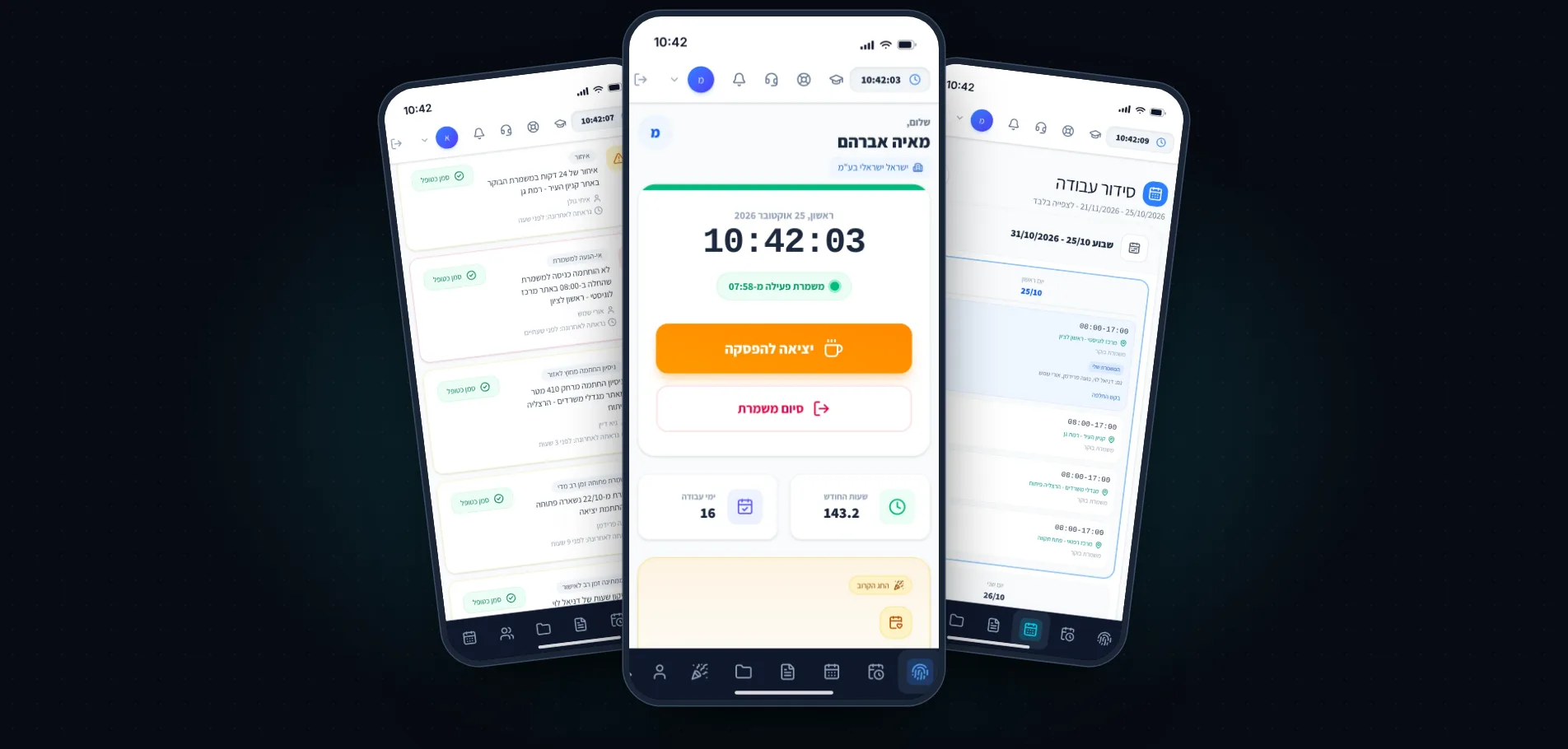
The screenshots show a demo company, “Israel Israeli Ltd.” (sample data): a services company with crews in several cities. Without a single system, every month-end turns into manual data chasing. We developed the solution for this kind of attendance management as a product of our own, Just-In, and built its app in clean code by developers.

  • No certainty who is on site: managers do not know in real time who arrived, who is late or who did not show, until someone calls.
  • Scattered shift planning: shifts are sent by message, swaps happen verbally, and nobody holds a single version of the truth.
  • Month-end timesheet fixes: forgot to punch? Corrections, notes and leave requests arrive from every direction and pile up before payroll.

02. The solutionWhat the employee sees, and what the manager sees

The same system, two views. Employees see only what they need: punch, hours, schedule and requests. Managers get a live picture, alerts and tools to correct and approve. Tap a screen to enlarge it.

03. How it worksFrom setup to payroll report, without friction

  • Set up sites and people: add sites with a location radius, assign employees and send them access. An NFC tag at the site entrance is optional.
  • People work, the system records: location-verified punches, a shared schedule, and requests that flow through the app instead of messages.
  • Managers approve and export: exception alerts all month, timesheet approval, and payroll-ready reports at month-end.

What the app includes:

  • Location-verified punching
  • Scheduling and shift swaps
  • Late and no-show alerts
  • Leave and sick requests
  • Timesheets and an audit log
  • A smart assistant for questions about your data

What does an attendance app for field crews include?

A good attendance app is built around two people: the employee who needs to punch in with one tap, and the manager who needs to know what is happening now. On the employee side there is clock-in, break and clock-out with location verification against the work site, a personal timesheet, a work schedule with swap requests, and leave requests with live status. On the manager side there is a live dashboard, smart alerts on late arrivals, no-shows, out-of-site punches and shifts left open, timesheet editing with an audit log, and an AI assistant you can ask questions about the company’s data.

The app is the mobile part of Just-In, the smart time clock, the product we developed ourselves. You can see the project in the field, including rollout to construction crews, in the Just-In case study, and our approach to business apps in app design and development.

How do location verification and scheduling save manual work at month-end?

Most manual work at month-end comes from missing punches, hours recorded at the wrong site and shift swaps made verbally. When every punch is verified against a work site with a defined radius, and swap and leave requests flow through the app, the manager sees exceptions during the month and does not discover them on payday. An approved timesheet is ready for a payroll report, and every correction is written to an audit log.

Employee data is sensitive, so the system is built with permissions and an audit log, and on hosting and security at a high standard. If you need a field-crew app tailored to your business, we also built a field app for drivers and surveyors for Fredi Furniture Industries.

Further reading

// FAQ

Frequently asked questions

What is an attendance app for field crews?
An app that replaces spreadsheets, messages and paper sheets: the employee punches in from the phone, the manager sees in real time who is on site, and the system flags exceptions such as late arrivals or no-shows.
How do you verify that the employee is really at the work site?
Each site is defined with a location radius, and the punch is verified against the phone’s location. You can also add an NFC tag at the site entrance.
Which alerts does the manager receive?
Late arrivals, no-shows, out-of-site punches and shifts left open. The system flags each of them, and the manager marks it as handled.
How do you fix hours that were forgotten?
The employee can request a time correction right from the day in the personal timesheet, and the manager opens the monthly sheet, fixes it, fills a range of days and approves. Every change is written to an audit log.
What does the smart assistant in the app do?
It answers questions at once, such as “How many hours did Maya work this month?” or “Who was late?”, from the company’s own data and without opening reports.
Are the screens on this page from a real client?
No. The screens show sample data of a fictional company (“Israel Israeli Ltd.”), to show the app without exposing client data.
How long can I try Just-In?
There is a 30-day free trial, with no credit card. We set up sites and people and guide the first steps.

Want to see this with your own team?

30-day free trial, no credit card. We will help you set up sites and people and guide your first steps.

Enlarged view