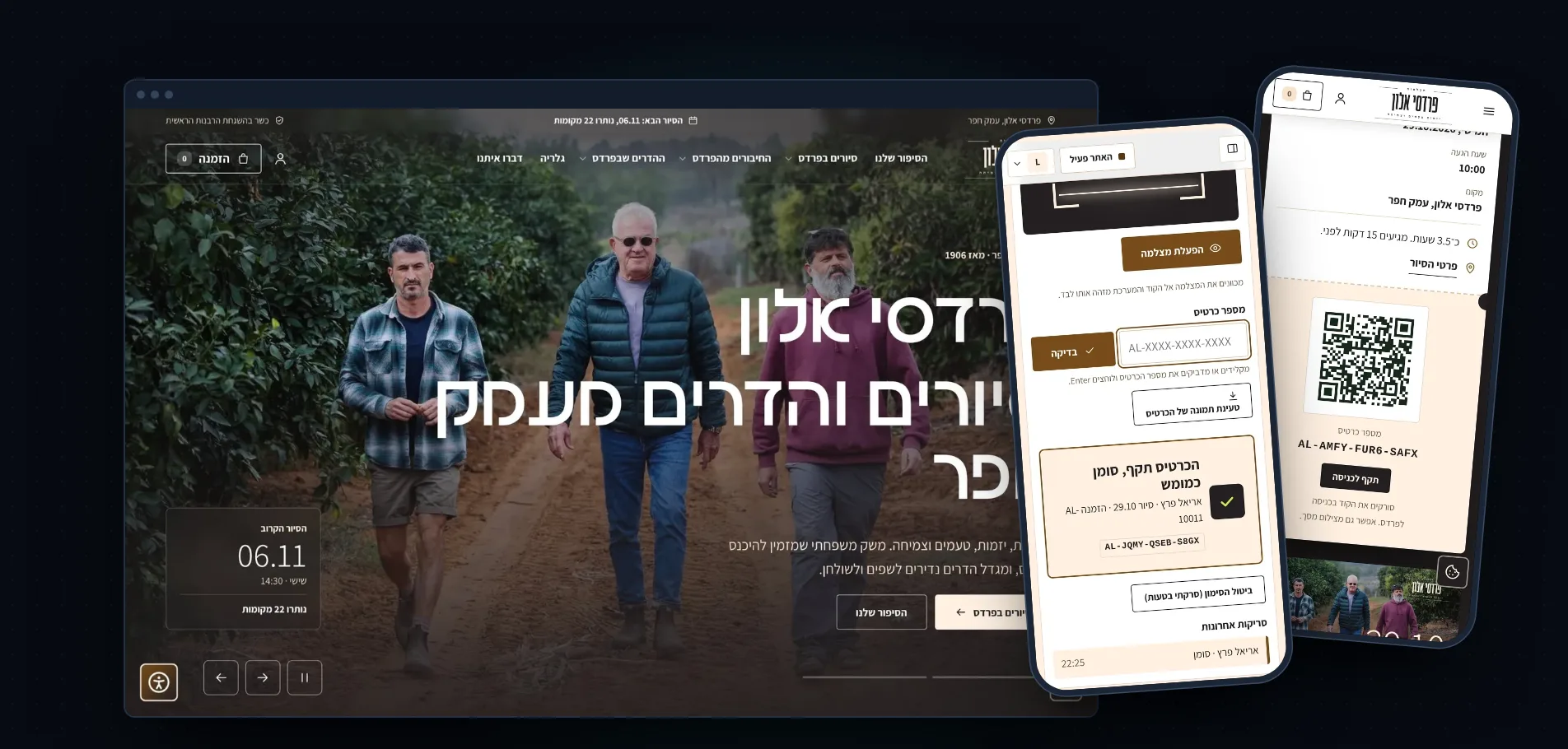
Website, booking and barcode tickets for orchard tours: the digital home of Pardes Alon
Pardes Alon is a family orchard in Emek Hefer that has kept an agricultural tradition since 1906 and opens its gates for tours. We developed for it a tours site with booking and payment, a barcode ticket with a unique code for every participant, a ticket scanner at the gate and an admin interface the team controls by itself, all in clean code written from scratch.
A project we donated wholeheartedly. We donated this site for a good cause, and the project is published here with the approval of Pardes Alon.
Pardes Alon, a family orchard in Emek Hefer
Agritourism and orchard tours
Website, booking and payment, barcode tickets, scanner and admin interface
Hebrew, right-to-left
A Logicode donation for a good cause
5Clear scan results at the gate
3Ways to identify a ticket
4Team roles and permissions
60Bits of randomness in every ticket number
The site’s home page, a participant’s barcode ticket and the gate scanning screen. Ticket and interface data is demo data.
01. Background and problemFrom WhatsApp messages to one digital home
A family orchard is not a software company. The people who run it work in the field, farming in the morning and hosting groups afterwards. As the tours began to gain momentum, it became clear that the process behind them rested on things that do not last: WhatsApp messages, manual lists, payments collected separately, and requests of “can we add two more people?” arriving at all hours.
The challenges we defined:
Simple, safe booking: the customer needs to pick a date, see a clear price and pay, with no phone call and no waiting for approval.
A real story, not a template: the orchard has character: people, trees, varieties and history. The site cannot look like yet another generic booking site.
Full control for the team: tour dates, prices, coupons, texts and images are updated by the team itself, with no developer.
Order at the tour entrance: who booked, who paid, who has already entered, and how to prevent the same ticket being used twice or passed on.
Accessibility and privacy: an Israeli site that collects personal details must follow the law: an accessibility statement, cookie consent, a privacy policy and handling of deletion requests.
Built for the phone: most visitors arrive from mobile, social networks and WhatsApp, so the whole booking journey has to work well on a small screen.
02. Our approachWe start from the tour, not from the technology
We sat down with the team and understood what a tour day looks like, from the moment someone types “orchard tour” to the moment they stand at the gate, and built the whole system backwards from there. As in every Logicode project, the code was written from scratch by developers, with no ready-made templates and no heavy plugins. Every part of the system has a clear role, so the site is fast, it can be understood, and it can keep being developed without breaking things.
The principles that guided us:
The customer books without thinking. Every step of the booking shows exactly what is happening now, what it costs and what comes next.
The team controls everything. Everything that can change (dates, prices, discounts, texts, images, messages) is data that can be edited from a screen, not code.
Every action leaves a trace. Who changed, who scanned, who cancelled, all saved in a log.
A fault does not drop a booking. If the payment gateway is unavailable, there is an alternative route to book on WhatsApp, so no customer is lost.
The tours page, with date selection and the price shown.
03. The booking journeyFrom discovery to payment
The tour page
The tour page is the core of the site. It presents the story, what awaits the participants, accessibility and field conditions, frequently asked questions and a calendar of dates. The customer picks a date and time and immediately sees the price per person and per couple.
A tour page on desktop.The same page on mobile.
“The orchard table”: a seat map
When choosing the quantity, the customer sees the seats as a map and not just a number in a box. It gives the feeling of a real booking for a specific place, and reduces mistakes in quantity.
Discounts and smart pricing
A couple discount in percent: the percentage is set on the settings screen, and the system calculates the couple price on the tour page, in the price table, in the FAQ, in the registration form and in the cart, all always in sync.
Multiple coupons: the team creates, edits and deletes coupons from a dedicated screen: code, discount percentage, usage limit, validity and a note. The system counts uses in real time and does not allow an expired or used-up coupon.
A free booking: when a coupon brings the total to zero, the booking is confirmed automatically, with no needless trip to a payment gateway, and the customer immediately receives a confirmation and tickets.
Coupon management in the admin interface: creating, editing, deleting, limits and validity.
Cart and payment
The cart and payment were built to be short and clear. The details are collected in one form, the total is shown transparently (including discounts), and payment is made in a secure clearing gateway with an invoice issued. Return addresses are signed, and payment attempts are saved in a log. An incomplete booking releases the seats after a set time, so unpaid seats do not stay blocked.
The checkout screen on desktop.The payment screen on mobile.
Groups and events
Groups, companies and events have a dedicated enquiry form with the option to state the type of event (including “other”), and a redirect to the team’s WhatsApp for quick coordination.
04. The ticketing systemA unique barcode for every participant and scanning at the gate
This is the part we enjoyed building most, and the one that turns the site from a booking system into a real operating system for tour day.
The problem
An entry ticket is a promise: one person, one tour, one entry. Without a mechanism, all that is left is a list of names on a sheet and a manual check at the gate, with a group waiting and a chain of messages nobody knows whether anyone handled. When a ticket can be passed on, photographed, copied or used twice, you need a system that decides in a second.
The solution: a unique ticket for every participant
For every participant booked, and not for every order, the system issues a separate ticket with a unique code that cannot be guessed.
A unique ticket number in a readable format such as AL-XXXX-XXXX-XXXX, generated at random and containing 60 bits of randomness. You cannot reach someone else’s ticket by guessing or counting.
No confusing characters: the system removes look-alike letters and digits from the alphabet (0, O, 1, I), so that even manual typing at the gate does not fail.
A QR barcode on every ticket, carrying the ticket address. It can be scanned with a camera, or the number can be typed manually.
A personal ticket page that the customer receives by message and email: date, arrival time, place, ticket number and barcode, and a button to print or save as PDF. The page is built for mobile and works also when shown from the screen or photographed.
Privacy: the ticket page shows first names only, and the page is not indexed by search engines and not cached.
The personal ticket page on mobile, with the barcode and the unique number. (A sample ticket from demo data.)The ticket page on desktop: a ticket for every participant, as “ticket 1 of 4”.
At the gate: the ticket scanner
On the admin side we built a dedicated scanning screen meant to run on the team’s phone at the orchard gate, with no app to install and no special equipment. There are three ways to identify a ticket:
Camera scan: point the camera at the barcode and read it.
Typing the ticket number when scanning is not possible.
Uploading an image of the ticket (for example a screenshot the customer sent).
Every scan returns one clear answer, with a colour and a mark, so it can be understood at a glance:
Valid: the ticket is genuine, valid for today’s tour and not yet used. The system shows the participant’s name and the tour details, and marks the ticket as redeemed.
Already used: the ticket has already been scanned. The system shows when and by whom, so it can be settled on the spot.
Cancelled: the booking was cancelled or refunded, and the ticket does not grant entry.
Wrong date: a genuine ticket meant for another tour. The system shows when it is valid.
Unknown: the number does not exist in the system.
A valid scan on mobile: the ticket is approved and the participant is marked as entered.An attempt to reuse a used ticket: the system blocks it and shows when the ticket was redeemed.
The scanning screen on desktop: camera, manual entry and image upload.A cancelled ticket.A ticket for another date.An unknown number.
A redemption that cannot be bypassed
The technical part that matters most to us: redeeming a ticket is an atomic operation. The system marks a ticket as redeemed in a single database operation, only if it is still valid. So even if two team members scan the same barcode in the same second from two phones, only one of them gets “valid” and the other gets “already used”. There is no double entry because of timing.
Every redemption is saved with the time and the user who performed it, and is also written to the system’s action log. Scanning by mistake happens, so there is an “undo the mark (I scanned by mistake)” option that returns the ticket to valid. That action is also logged, so you can see who corrected and when.
A real-time attendance list
The attendance screen shows all the participants of the tour: who has entered and who has not yet, how many tickets were redeemed out of how many were booked, and a log of recent scans. You can mark manually, cancel or restore a ticket, mark everyone at once, and export the list to a file. Export is available only to those authorised.
An attendance list for a tour, with the ticket status of every participant and a scan log.The attendance list on a tablet, convenient for the team standing at the gate.
Those who arrive without a booking
A group joining on the spot has on-site registration (“walk-in”): the team types a name and phone number, and the system opens a booking, issues a ticket and marks it at once, so even last-minute participants are included in the lists and reports.
Permissions: who may scan
Not every team member sees everything. There is a scanner role limited to scanning only, so whoever stands at the gate sees the scanning screen and not the revenue, the coupons or the settings. The owner and manager roles can see everything, and sensitive actions (such as cancelling a ticket or exporting) require the appropriate permission.
Communication with participants
The ticket is not sent by hand. Message templates can be edited from the interface, and an automatic reminder before the tour and a thank-you message after it are sent by WhatsApp and email, including a personal link to each participant’s ticket.
Message templates: reminder, ticket and thanks, editable without a developer.
What this gives the orchard
No more lists on a sheet: every participant is a record, and every entry is logged.
No double entry, and no argument at the gate over a copied ticket.
The team has an accurate real-time picture of who has arrived.
The customer gets a professional experience, with a personal ticket on the phone, a barcode and timely messages.
05. The admin interfaceA look inside the system
The interface was built in full Hebrew, right to left, and works on the phone and the tablet too. All the interface screenshots are based on fictitious demo data, not on real customer data.
Dashboard
A snapshot of what is happening now: recent orders, upcoming tours, revenue and actions that need attention.
The dashboard on desktop.The dashboard on mobile.
Orders
A list of all orders with payment status, filtering and search, and a detailed order screen: customer details, participants, payment, invoice and tickets.
The orders list.Order details.
Tour calendar and registrants
A calendar of all the dates, with occupancy for each tour. Editing a tour includes price, places, an image gallery and content fields. The registrants screen gathers everyone registered for every date.
The tour calendar.Editing a tour.The registrants screen.
Reports
Overview, sales and tours reports, including a flexible report builder that lets you choose data and export for print, PDF or Excel.
Overview report.Sales report.Tours report.
Content and image management
The content editor lets the team change texts and images on the site’s pages without touching code, with an automatic media library that shrinks and optimises images so the site stays fast.
Editing texts and images on the site’s pages.
Built-in search optimisation
An SEO panel that shows a score for each page, lets you edit titles and descriptions, manage redirects and track 404 pages.
The SEO panel.
Customers and settings
A customers screen with order history, general settings (contact details, social networks, pricing, site status), and user management with roles.
Customer management.Site settings.
06. More parts of the siteA story of varieties, a gallery and a personal area
Citrus and connections
Pardes Alon is also a story of varieties. We built a full citrus area, with variety pages (“yuzu” and more) and links between varieties and tours, so the content itself becomes part of the booking experience and feeds organic search.
The citrus area.A sample variety page.
Gallery
A visual gallery with a managed media library, and the ability to choose which images appear in which tours.
The gallery.
A personal customer area
A registered customer sees their bookings and tickets in one place, without searching through emails.
Accessibility and privacy
A built-in accessibility menu, an accessibility statement, a cookie consent banner, a privacy policy and terms of use, and a screen for managing privacy requests (access and deletion) for the team.
Home page and about
The home page on mobile.The about page.
07. Behind the scenesThe technology and the process
The technology
Code from scratch, no templates: all the code was written by developers for Pardes Alon alone, with no site builders and no heavy plugins.
A secure payment gateway: integration with a clearing gateway, signed addresses, a log of payment attempts and invoice issuing. Sensitive credit card data does not pass through the site.
Synchronised data: price, discounts and quantities are calculated in one place and shown identically wherever the customer sees them.
Roles and permissions: owner, manager, editor and scanner, each with access only to what they need.
Security: a password policy, request rate limiting, protection against guessing attempts, signed addresses and a full action log.
Speed: images are automatically converted to an efficient format, images out of view are loaded lazily, and pages are built on the server side.
Hosting environment: the site runs on regular shared hosting, with an optimisation that allows version updates by uploading files and running a single database script, with no commands run on the server.
The work process
Specification: we mapped with the team the tour day, the customer journey and the data that matters, and decided what goes into the first version.
Design: a design that serves the story: real photos from the orchard, clean Hebrew typography and a palette taken from the field (leaf green, earth brown, citrus orange).
Development: building in stages: booking journey, payment, admin interface, and then the ticketing system.
Testing and security: tests on different screens, full booking journeys, edge cases (a failed payment, an expired coupon, a ticket scanned twice) and a security review.
Launch and support: uploading to the server, training for the team and ongoing updates according to needs that arise in the field, such as new coupons, discounts and content.
Adjustments added along the way
After launch, the needs kept evolving, and the system is flexible enough to cope: a couple discount calculated by percentage, several coupons in parallel, free bookings, hiding or showing images and content as needed, and updates of contact details and social networks. All of these were done as an extension of the system, without breaking anything.
The booking cart on desktop.
08. The result in the fieldOne system instead of scattered tools
Pardes Alon received one system that replaces several scattered tools: a site that tells the story, booking and payment in minutes, a personal barcode ticket for every participant, scanning at the gate and an admin interface the team controls by itself.
What changed in practice:
Bookings are made on the site with secure payment, with no round of messages.
Every participant receives a personal ticket, and on tour day the team scans and marks attendance on the phone.
Prices, coupons and content are updated by the team.
There is a full picture of bookings, revenue and attendance.
09. Organic searchSEO planned already in the build stage
A clear page structure: tours, citrus, gallery, about and contact pages, with tailored titles, descriptions and images.
Original content: the citrus area creates pages that match searches such as “yuzu in Israel” or “orchard tours in Emek Hefer”, and give the site authority in the field.
Speed and mobile: optimised images, light pages and excellent mobile display, which are important ranking factors.
Structured data and tags: marking pages for good display in search results and when shared on social networks.
Easy manual management: the team edits titles and descriptions itself, manages redirects and tracks 404 errors.
Measurement: connection to tracking and conversion tools, subject to the user’s cookie consent.
What does a tours booking site with barcode tickets include?
A good tours booking site is built around tour day and not around the technology. On the customer side there is a tour page with a story, a price and a calendar of dates, quantity selection with a seat map, discounts and coupons, a cart and secure payment, and a personal area for bookings. On the team side there is an admin interface in Hebrew where dates, prices, coupons, texts and images are updated without a developer, and orders, revenue and attendance are seen in reports.
This is how we built the site of Pardes Alon, a family orchard in Emek Hefer. We developed the site as part of broad work on clean-code website development, and the booking and management system as part of advanced system development. We donated the project wholeheartedly for a good cause, and published it here with the client’s approval.
How does a barcode ticketing and gate scanning system work?
The system issues a separate ticket for every participant, and not for every order, with a random number that cannot be guessed and a QR barcode carrying the ticket address. At the gate the team scans with the phone camera, types the number or uploads an image, and reads one answer out of five: valid, already used, cancelled, wrong date or unknown. Redeeming a ticket is an atomic operation, so even if two scanners read the same barcode in the same second, only one of them gets approval.
The team also has a real-time attendance list, on-site registration for those who arrive without a booking, and a full action log. A scanner role is limited to scanning only, so whoever stands at the gate does not see revenue or settings. A system like this can also be used for workshops, lectures and events, and connected to existing systems through API integrations.
Why develop a custom booking system instead of using a ready-made one?
A ready-made system solves the general case, and on an orchard tour we wanted the ticket, booking, payment and scanning to be part of one system, with the same design, the same data and the same permissions, with no fee per ticket and no dependence on an outside company. A system written from scratch also lets you add coupons, discounts and adjustments later according to what arises in the field without breaking anything. It is worth starting with a proper specification, and checking an initial cost with the cost calculator.
Ready-made systems solve the general case, but an orchard tour is not a general event. We wanted the ticket, booking, payment and scanning to be part of one system, with the same design, the same data and the same permissions, with no fee per ticket and no dependence on an outside company.
How do you prevent a ticket from being copied?
Every ticket is unique, and the system guarantees that it is redeemed only once. Even if the barcode is copied or photographed, only the first scan is accepted. All other attempts are marked “already used”, with the time and the name of the scanner.
What happens if there is no signal at the gate?
The ticket can be shown from the screen or as a printed PDF, and the ticket number can be typed manually. In addition, the team has an organised attendance list that can be used also before the tour.
Can prices or discounts be changed without a developer?
Yes. Prices, the couple discount percentage, coupons, texts, images and message templates are edited from the admin screens.
What if the payment gateway is down?
The booking is not lost: there is an alternative route to book through WhatsApp, and the system does not duplicate bookings and does not block seats forever.
Does the site meet accessibility and privacy requirements?
The site includes an accessibility menu, an accessibility statement, cookie consent, a privacy policy and a mechanism for handling privacy requests. You can read about hosting and security under hosting, security and maintenance.
How long does it take to build a site with a booking and ticketing system?
It depends on the scope. A project like Pardes Alon, with a site, bookings, payment, tickets and an admin interface, is built in stages. We would be glad to give an accurate estimate after a specification call through contact.
Can a ticketing and scanning system be added to an existing site?
Absolutely. The ticketing system is built as a module, and can be integrated also into other businesses: tours, workshops, lectures, events and tastings. This is part of custom development.
Do you build on templates or WordPress?
No. We write clean code from scratch, tailored to the business.
Who can update the site after launch?
Your team, through the admin interface. And if something new is needed, we are here.
Do you support the project after launch?
Yes. We keep developing and updating, as we did for Pardes Alon, according to what arises in the field.
Want a booking and ticketing site for your business?
We do not build sites, we develop them. A software development company from Haifa with human developers and clean code written from scratch. Tell us what your activity day looks like, and we will come back with an accurate proposal.